
Help · Scorekeeper Guide
A game in 6 taps
- Sign in to playnsc.com and open playnsc.com/score. You land straight in the scorekeeper.
- Tonight's first game is already up. Tap Kick off when play starts.
- Someone scores: tap Goal under their team, then tap the scorer's name.
- Tap Halftime, then Start 2nd half.
- Tap Full time when it's over.
- The next game loads by itself. Repeat.
How do I get in?
Sign in to playnsc.com with your own account (the email link or Google), on your phone is fine, then open playnsc.com/score or tap Keep score on your My shifts page (playnsc.com/staff). Nothing to install, and you stay signed in for 30 days.
If it says keeping score is for staff and volunteers, you have not been added yet: ask the front desk to give you the Scorekeeper job.
What am I looking at?
The big scoreboard at the top is the game you're running: the live game, or the next one scheduled. Tonight's league is picked for you automatically.
Below that, Up next lists the rest of the night in order. Tap any game card to bring it up top. Finished games drop to Finished tonight at the bottom with their scores.
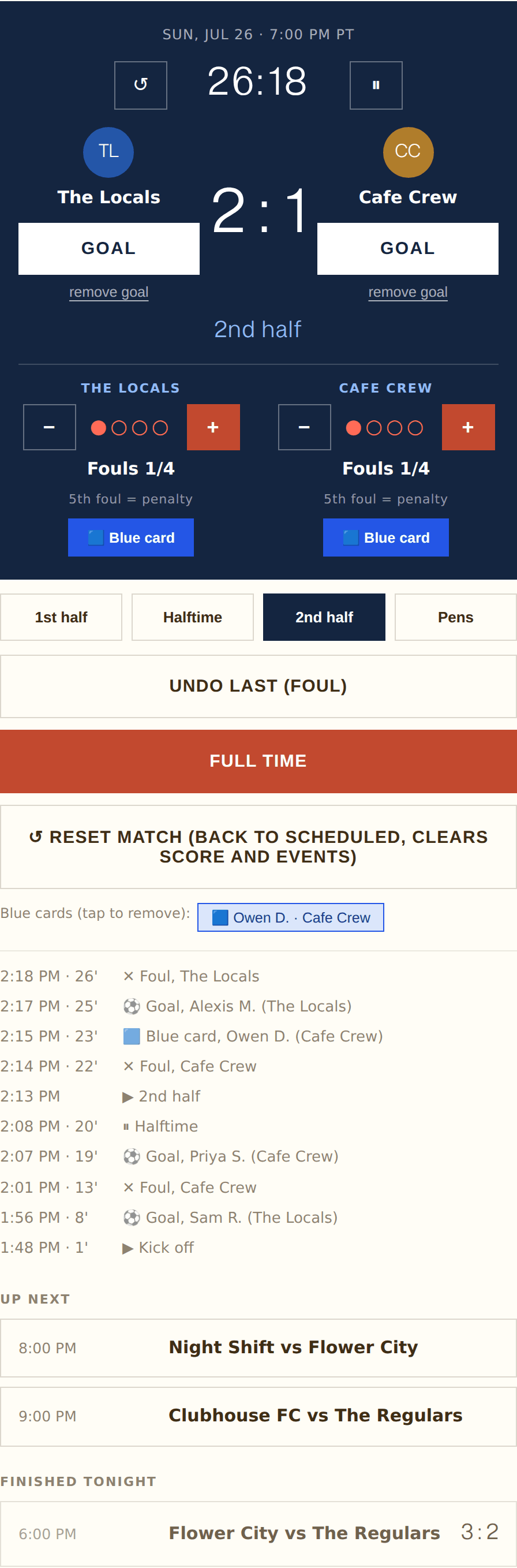
A game mid 2nd half (demo teams): clock, scoreboard, foul trackers, actions, event log, and the rest of the night below.
How do I start a game?
Tap Kick off when the game actually starts. The clock starts counting and the foul trackers appear.
If another game is still marked live, you'll get a warning first. Usually that means the previous game never got its Full time tap, so go finish that one, then kick off yours.
How do I record a goal?
Tap Goal under the team that scored, then tap the scorer's name from the roster. The score updates and the goal is logged with the game time.
- Scorer not on the list? Tap Other... and type their name.
- Own goal, or nobody caught who scored? Tap Own goal / unknown. The goal still counts for the right team.
- Wrong tap? remove goal under the same team takes back their most recent goal.
Getting the scorer right matters: goals feed the standings, the Golden Boot race, and each player's page on the site.
How do fouls work?
Each team has a foul tracker with four dots. Tap + on a team every time they commit a foul.
On a team's fifth foul of the half, the app automatically awards a penalty to the other team and resets that team's count. You'll see a note when a team is sitting on four fouls: next one is a penalty.
Mis-tapped? The − button removes that team's most recent foul this half (and the penalty it triggered, if it was the fifth).
What about blue cards?
Tap 🟦 Blue card under the offending team and pick the player (or Skip / unknown). It's logged with the game time and shows on the public match page.
Given one by mistake? Blue cards appear as pills under the action buttons. Tap the pill to remove it.
How does the clock work?
Games are two 20 minute halves and the clock counts up on its own, so mostly you can ignore it. If you need to:
- ⏸ pauses it (injury, long stoppage) and ▶ resumes. A banner reminds you while it's paused.
- ↺ next to the clock resets the current period to 0:00, for when kickoff got tapped early.
The clock on screen is for reference. Time on the pitch is whatever the referee says it is.
Halftime and ending the game
Tap Halftime at the break, Start 2nd half when play resumes, and Full time at the end. After full time the game files itself under Finished tonight and the next game comes up automatically.
Level score? Follow the prompt on screen. Regular season games simply end as a draw. Playoff games go to overtime (two 5 minute halves) and then a penalty shootout if still level; the app walks you through it, with a button per team for each converted pen and End shootout once there's a winner.
If it asks "End the game?" earlier than expected, that's just a sanity check because the half seems short. Confirm if it's real.
I made a mistake. How do I fix it?
Everything is fixable, in roughly this order of firepower:
- Undo last takes back the most recent goal, foul, pen, or blue card, whatever it was.
- remove goal, the foul −, and tapping a blue card pill fix a specific entry.
- The period pills (1st half, Halftime, 2nd half...) jump the game to the right period if it's in the wrong one.
- Reopen game brings a finished game back to live, for when Full time got tapped early or a score needs a proper fix.
- Reset match is the nuclear option: score, goals, fouls, cards and clock all cleared, back to scheduled. It asks first. Use it only when a game got mangled beyond patching.
Do I need to save anything?
No. Every tap saves to the site instantly, and standings, schedules and player pages update on their own. There is no save button to forget.
If your phone dies or the page glitches, just reopen playnsc.com/score. The game will be exactly where you left it.
Something's wrong and I'm mid-game
Keep score on paper for a minute, reopen playnsc.com/score, and catch the app up with the Goal and foul buttons; every event is timestamped when you enter it, and close enough is fine.
Still stuck? Tell the front desk or the league manager. Games can always be fixed after the fact, so the score on the pitch is never lost.